
How to Contact Support
Pulse support requests are handled through the Telestream Support Portal. Before you open a ticket, generate a diagnostic file from the Pulse application and attach it to your request. The file contains the logs and system details our support engineers need, so they can start on your issue without a round of follow-up questions.
To open your support ticket
Sign in to the Support Portal (also available from the Help menu in Pulse), create a new case for Pulse, and attach the diagnostic file. Attach the .tar.gz file as downloaded; there’s no need to extract it.
New to the Support Portal? Select “Not a member?” on the sign-in page to register.
To help us resolve your issue faster, include:
- Your Pulse software version
- A short description of the issue and what you expected to happen
- The date, time and time zone when the issue occurred
- The affected streams, sources or dashboards
- Whether the issue is ongoing or intermittent
Generate a Diagnostic File
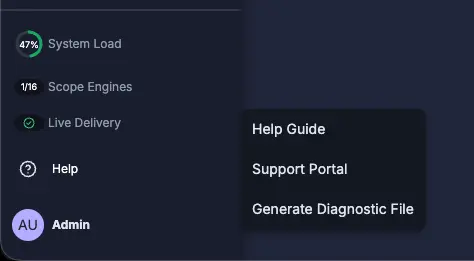
1Help › Generate Diagnostic File
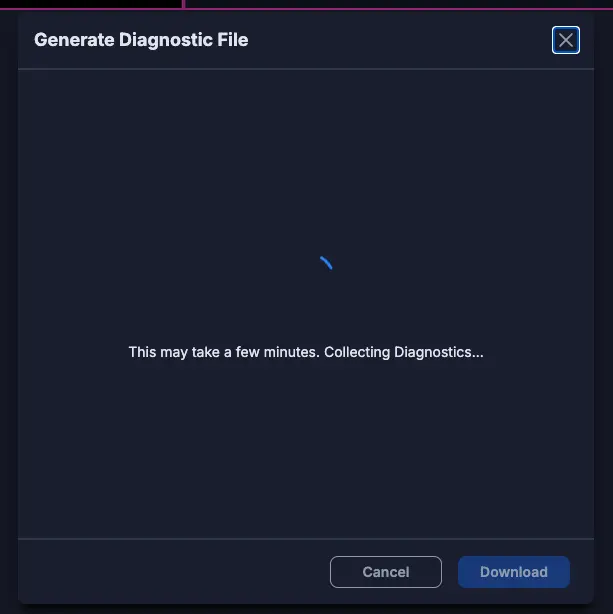
2Pulse collects the diagnostic data
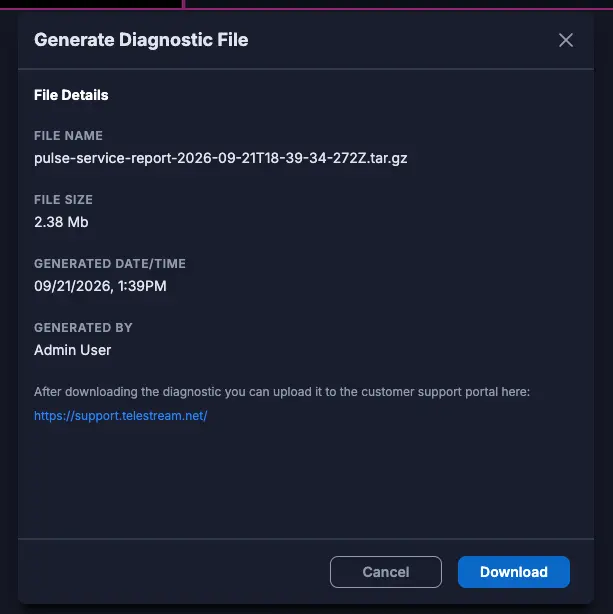
3Download the file and attach it to your ticket
Pulse Documentation
- Pulse User Guide (PDF · 141 pages · 74-0405-A)
- Pulse Installation and Safety Guide (PDF · 31 pages · 74-0403-A)
- Pulse License – Software Update Instructions (PDF · 2 pages)